
Solana wallets collect leftovers over time. Not just random tokens – but SOL itself, locked as rent inside accounts your wallet created months or years ago. You might have interacted with old mints, airdrops, failed experiments, dead memecoins, or outdated apps, and ended up with accounts that can be cleaned up to reclaim SOL.
We launched a set of agent-ready tools that make it possible to claim SOL with AI across three ecosystems:
- ChatGPT GPT (easy, no setup)
- OpenClaw skill (agent skill distribution via ClawHub)
- MCP server (developer-grade integration for AI clients like Claude Desktop, Cursor, Windsurf, and more)
Links:
- ChatGPT GPT: https://chatgpt.com/g/g-6994c9a63d388191a96b762a5a8b42ab-unclaimed-sol-scanner
- OpenClaw: https://github.com/unclaimed-sol/openclaw-skills and https://clawhub.ai/nedim1511/unclaimed-sol-scanner
- MCP: https://www.npmjs.com/package/@unclaimed-sol/mcp
What “claim SOL” means here
When people say “claim SOL”, they usually mean one thing. In reality, reclaimable SOL often comes from multiple account types created as side effects of normal usage.
This project targets reclaimable SOL commonly found in:
- Dormant token accounts (often empty accounts that still carry rent deposit)
- Program buffer accounts (leftovers created by program deployment and related flows)
The scanner’s job is to identify what can be reclaimed and how much is at stake – then let you choose the path to claiming depending on where you’re running the tool (ChatGPT, OpenClaw agent, or MCP client).
Why ship in three places?
1) ChatGPT – the simplest “scan it now” experience
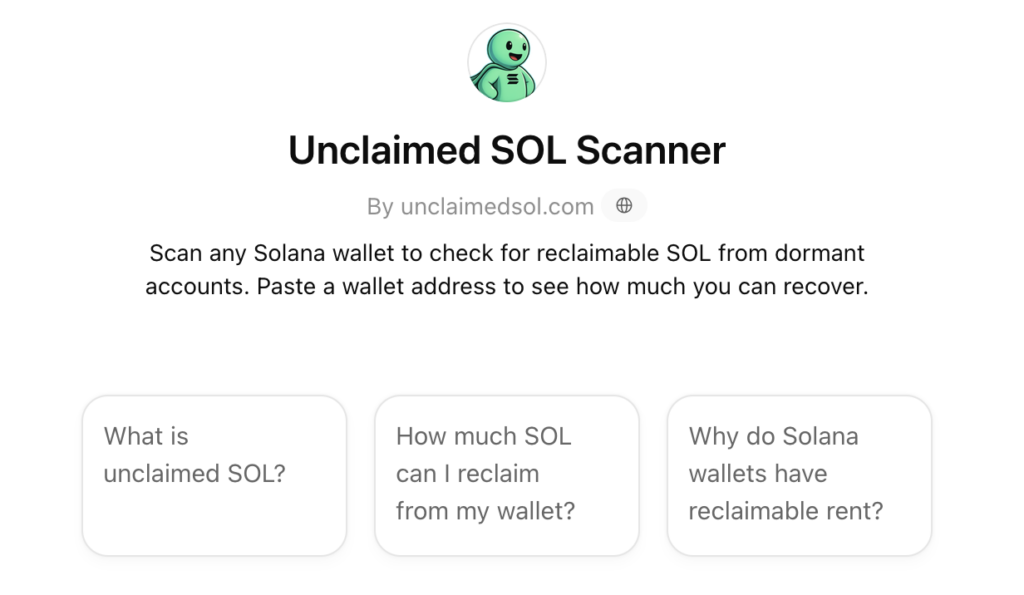
Some users just want the answer. Paste a wallet address, get:
- total claimable SOL
- a breakdown of where it comes from
- next steps
ChatGPT is perfect for top-of-funnel discovery: quick, safe, and no terminal required. You can try it here: https://chatgpt.com/g/g-6994c9a63d388191a96b762a5a8b42ab-unclaimed-sol-scanner
2) OpenClaw – “skills” that agents can use
OpenClaw is built around reusable skills that agents can call consistently. Our OpenClaw skill is designed to be:
- read-only by default
- no private keys
- no signing
- scan and report, then route users to claim through the standard flow
That separation is intentional. It keeps agent usage safe while still delivering value immediately.
3) MCP – the serious “claim SOL with AI” bridge
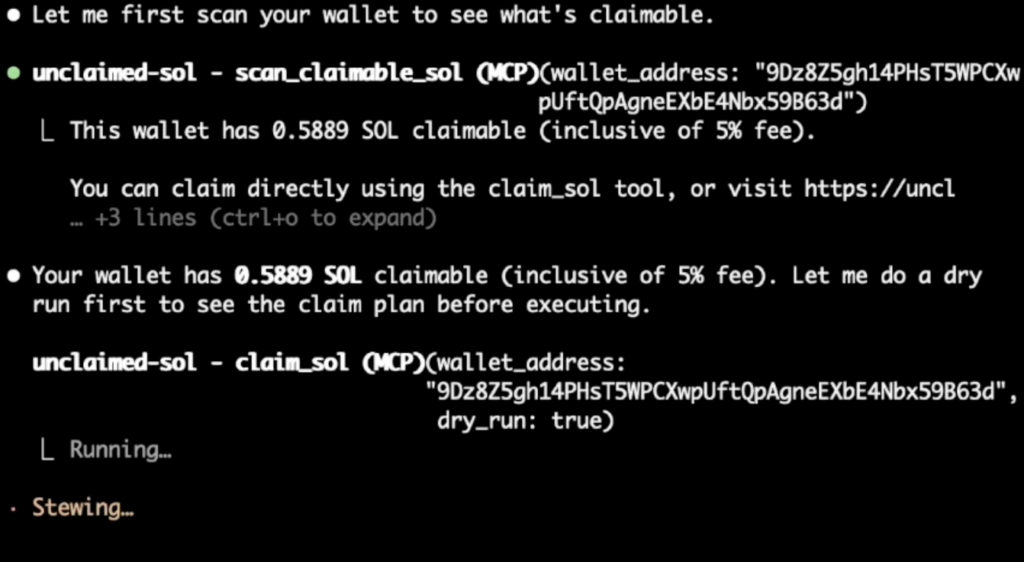
MCP (Model Context Protocol) is where tool-using assistants get real. With MCP you can plug a capability into an AI client and let the agent call it like a function – locally, with your own rules.
Our MCP server supports two modes:
- scan-only (safe default)
- opt-in claiming (local signing, guardrails, deliberate execution)
If you want an AI agent to help you actually claim, MCP is the best home for that.
How claiming works (scan-only vs opt-in claiming)
Mode A: Scan-only (recommended default)
This is the safest way to use an AI agent:
- No keys
- No transactions
- No irreversible actions
You ask the agent to scan a wallet, and it returns what it finds. This is ideal for:
- content creators
- support teams
- analysts
- “check my wallet first” users
Mode B: Opt-in claiming (power users)
If you want to truly claim SOL with AI, you need a controlled environment where signing is local and actions are intentional.
That’s what MCP enables.
In claim mode, the MCP tool flow is built to prevent accidental execution:
- You run a dry run first
- It returns a short-lived execution token
- You must explicitly execute with that token
This pattern forces a deliberate “yes, do it” step, rather than letting an agent fire a transaction on a whim.
Important note:
- Closing accounts is irreversible. Use scan-only unless you fully understand the flow.
What makes this “agent-safe” by design
AI agents are powerful, but wallet actions should never be casual. So the architecture follows a simple rule:
- AI is great at discovery, summarizing, explaining, and planning
- Claiming should be opt-in, locally signed, and protected by guardrails
That’s why:
- ChatGPT and OpenClaw are positioned primarily for scanning + guidance
- MCP is where claiming lives, because you can enforce local signing and safety checks
This approach lets you benefit from agents without turning “paste wallet” into “oops, I signed something”.
Who this is for
If you’re a normal user
Use the ChatGPT GPT to:
- estimate claimable SOL
- understand where it comes from
- decide if it’s worth doing
Then claim through your preferred flow.
If you build agents or workflows
Use OpenClaw if you want:
- standardized skill calling
- safe scanning inside agent systems
- distribution via ClawHub
If you’re a dev who wants automation
Use MCP if you want:
- a real tool interface for assistants
- scan-only automation in IDEs
- opt-in claiming with local signing and strict execution control
If you actually prefer user interfaces, then you should read our post on claiming using our website.
Example prompts you can use (copy-paste)
ChatGPT (scan-first)
- “Scan this Solana wallet and estimate how much SOL I can reclaim: <WALLET>”
- “Explain where reclaimable SOL usually comes from and what I should do next”
- “Give me a breakdown and the safest way to proceed”
MCP / agent client
- “Scan wallet <WALLET> for claimable SOL and summarize findings”
- “Do a dry run claim plan and show what would be closed”
- “Only if everything matches expectations, execute the claim”
FAQ
Is this really “claim SOL with AI” or just scanning?
Both. Scanning is always safe and available everywhere. Actual claiming is opt-in and best suited to MCP because it supports local signing and deliberate execution steps.
Why not let ChatGPT claim directly?
Because safe claiming requires local signing, environment control, and guardrails. Chat experiences are best for scanning, explanation, and routing users to the right place.
What do I need to use MCP?
You install the MCP package and add it to an MCP-compatible client configuration, then your agent can call the scan tool (and optionally claim mode if you enable it). Package is here: https://www.npmjs.com/package/@unclaimed-sol/mcp
Launch Links (again):
- ChatGPT GPT: https://chatgpt.com/g/g-6994c9a63d388191a96b762a5a8b42ab-unclaimed-sol-scanner
- OpenClaw: https://github.com/unclaimed-sol/openclaw-skills and https://clawhub.ai/nedim1511/unclaimed-sol-scanner
- MCP: https://www.npmjs.com/package/@unclaimed-sol/mcp
Closing CTA
If you want the fastest result:
- Use the ChatGPT GPT to scan a wallet in seconds
If you want agent distribution:
- Use the OpenClaw skill and keep it scan-only by default
If you want to truly claim SOL with AI:
- Use MCP, keep signing local, run dry runs first, and only execute when you’ve reviewed the plan