Table of Contents
If you’re trying to close Solana buffer accounts to reclaim SOL, you’re not alone – and you’re not imagining it. Failed program deploys and upgrades can leave SOL behind in program-related leftovers that many wallets never surface clearly.
In this guide, you’ll learn:
- What buffer-related leftovers are (in plain English)
- Why failed deploys/upgrades can leave SOL behind
- How to detect it safely
- How to reclaim lamports from buffer accounts without turning it into a multi-hour CLI rabbit hole
Quick take
- When a program deploy or upgrade fails, SOL that funded the process may remain sitting in program-related leftovers.
- Those leftovers can usually be recovered by the authority that created them.
- This is especially relevant if you deployed/upgraded programs in 2022-ish (or any time you were pushing changes under pressure).
What are Solana buffer accounts (and why do they exist)?
During program deploys and upgrades, Solana uses temporary staging mechanisms so program data can be uploaded safely. In normal conditions, everything completes and there’s nothing left to clean up.
But when deploys fail, upgrades are abandoned, or workflows get interrupted, the “temporary” part can stop being temporary.
Result:
- SOL gets left behind in program-related leftovers
- Devs forget about it
- The wallet UI often doesn’t present it as “claimable” SOL
This is why searches like close buffer accounts Solana and reclaim lamports from buffer accounts have become common in builder communities.
Why failed deploys/upgrades leave SOL behind
A failed deploy or upgrade can happen for many reasons:
- network congestion
- fee spikes at the wrong time
- tooling interruptions
- workflow mistakes under pressure
- aborted upgrade attempts
The common outcome:
- you paid SOL to fund deploy/upgrade steps
- the process didn’t fully complete
- some SOL remains parked in leftovers tied to that deploy/upgrade path
If you remember the “deploy-fail era” vibes from 2022, you already know how easy it was to end up with these.
Who should check this?
You should strongly consider checking if:
- you deployed or upgraded Solana programs (especially upgradeable programs)
- you used automation (Anchor scripts, CI, repeated deploy attempts)
- you had failed deploys and moved on quickly
- you’ve ever said “I think I lost SOL during deploy” and never fully investigated
Most wallets won’t have this.
But for the wallets that do, the amounts can be meaningful.
How to detect program-related leftovers safely
The hard part for most people is not “recovering” – it’s finding the leftovers reliably and knowing what is safe to clean up.
There are two broad approaches:
1) CLI/manual approach (for devs)
Yes – experienced devs can recover this manually using Solana CLI workflows.
The tradeoff:
- it’s cool/techy
- but it can be time-consuming
- and it’s easy to miss something or waste time enumerating accounts
- danger of compromising private key or messing something up if CLI not user correctn;y
If you’re comfortable living in CLI, that can be a good route.
2) Guided detection + reclaim flow (fast path)
The faster path is a guided scan that:
- detects program-related leftovers automatically
- shows an estimate before you approve anything
- prepares the recovery actions with normal wallet approvals
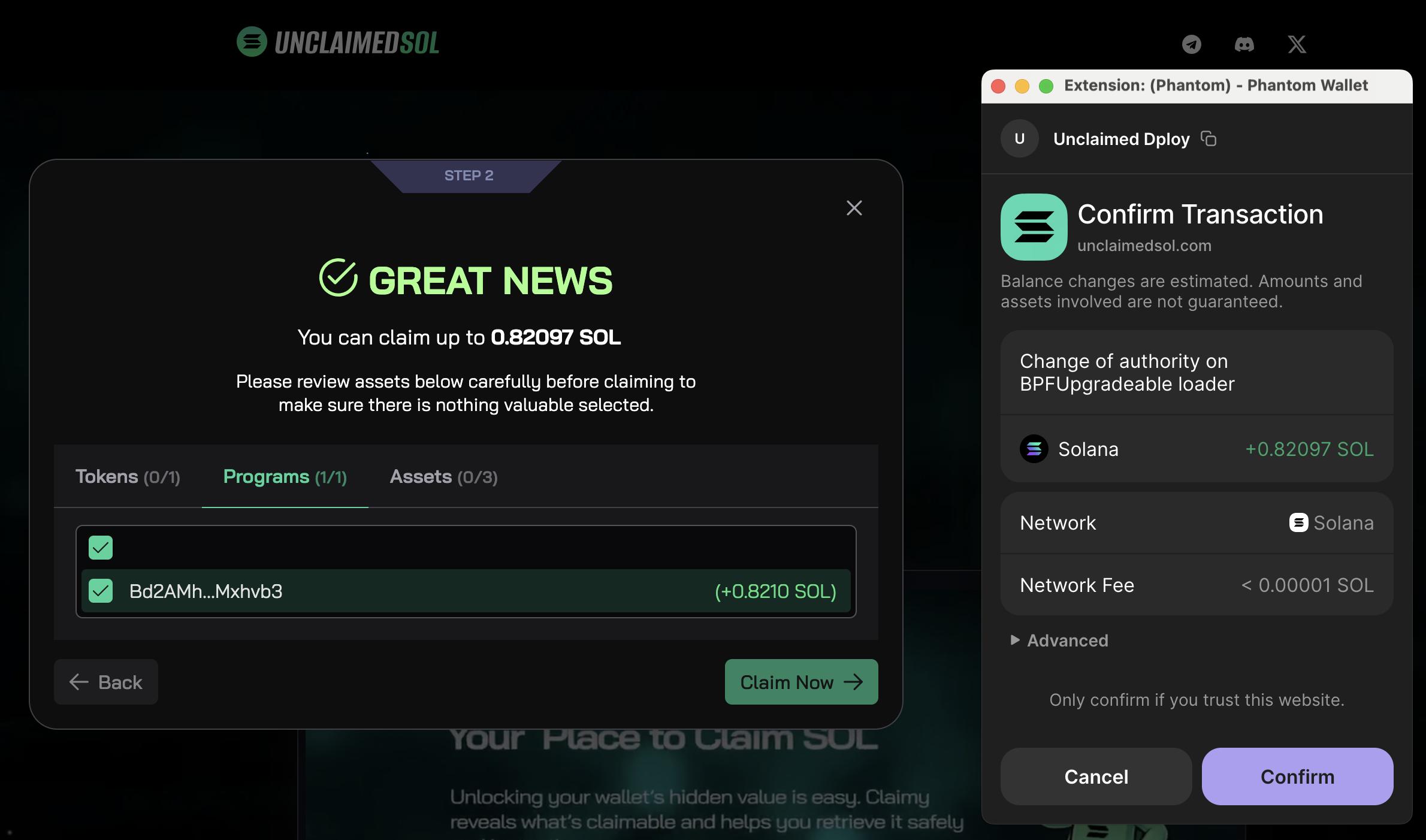
This is exactly why we added a Programs tab inside the Unclaimed SOL claim flow.
The Programs tab in Unclaimed SOL
We built Programs as an extension of the existing claim flow because this is the same core promise:
- detect SOL that’s genuinely reclaimable
- keep approvals explicit and wallet-native
- show the total claimable amount up front
- make the process fast, clear, and repeatable
What you’ll see
- a Programs section alongside your normal token-account reclaim results
- a clear total claimable number
- a breakdown so you understand where the SOL is coming from
Safety model
- you approve transactions in your favorite wallet like normal
- you can verify amounts before signing
- nothing happens without your explicit wallet approval
Fees and transparency
For Programs recovery we use:
- 10% fee, calculated in the claimable amount
That matters because this category is often “invisible” until detected, and users should never feel surprised by what they’re paying.
Common confusion: “Close program” vs “close buffer accounts”
These searches often get mixed together:
- solana close program
- solana close account
- close Solana buffer accounts
They are not the same thing.
- Closing a program is irreversible and has consequences (you can’t reuse the program id).
- Closing buffer-related leftovers is typically about reclaiming SOL that was funding staging/deploy attempts.
If you’re here because you suspect “SOL was left behind”, you’re usually dealing with the second category.
Checklist before reclaiming (recommended)
Before you approve anything:
- confirm the expected net amount
- confirm the recipient wallet address
- avoid rushing if the numbers look off
- if you’re using a fresh wallet setup, double-check you’re connected to the correct one
Simple habit: treat this like moving funds – verify the details first, then sign.
FAQ
What does “close Solana buffer accounts” mean?
It usually refers to cleaning up deploy/upgrade leftovers so the SOL (lamports) sitting in them can be returned to a normal wallet address.
Can I reclaim lamports from buffer accounts?
Yes, in many cases the lamports can be reclaimed by the authority that created or controls the leftover deploy/upgrade path.
Do all wallets have this?
No. Most wallets won’t. It’s most relevant for builders who deployed/upgraded programs and had failed attempts.
Is this the same as closing empty token accounts?
No. Empty token accounts are a separate category (classic rent reclaim). Program deploy/upgrade leftovers are different and typically require different detection logic.
Can I do this with CLI?
Yes. Devs can recover this via CLI. The tradeoff is time and complexity. The Programs tab is the guided, faster path.
How to reclaim your SOL
If you deployed/upgraded programs and had failed attempts, it’s worth checking once:
- run a scan
- open the Programs tab
- review the amounts
- approve in-wallet if it looks correct
👉 Go to https://unclaimedsol.com/ and try the Programs now!